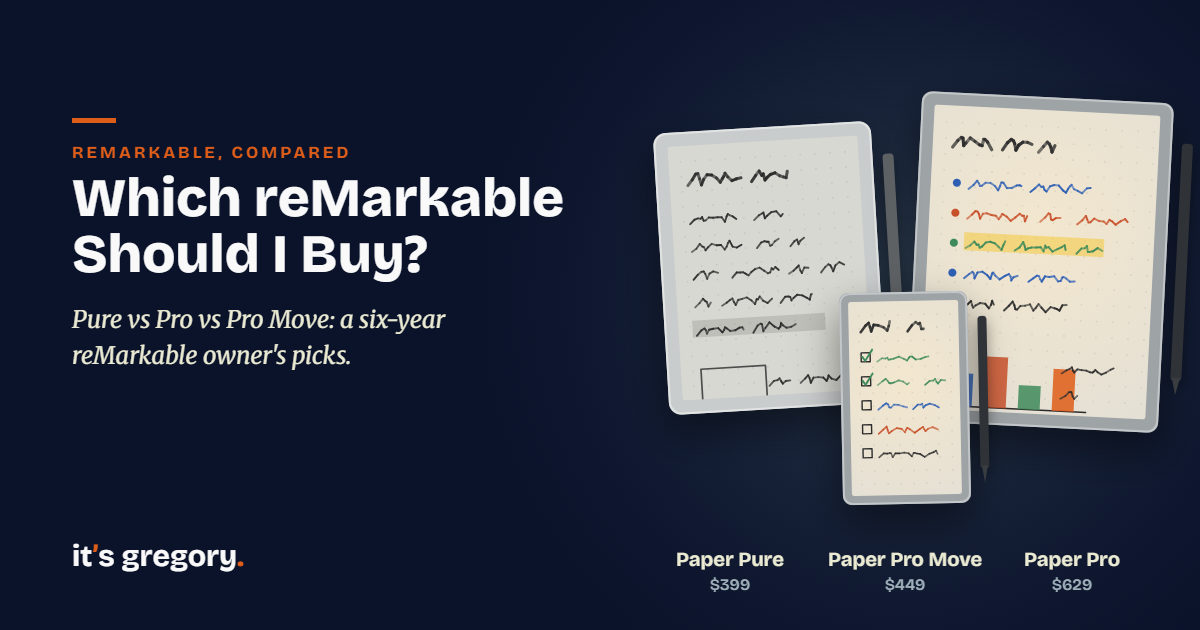
Which reMarkable Should I Buy? Pure vs Pro vs Pro Move
reMarkable now makes three paper tablets, in three sizes, with two kinds of screen and prices that run from $399 to well over $600. On the store page they look almost identical: the same thin slab, the same pen snapped to the side, the same promise of distraction-free writing. So which one should you buy?
Here’s the short answer to “which reMarkable should I buy?” For most people, it’s the Paper Pure. It’s the cheapest of the three at $399, it’s light, and it has the best pencil-on-paper writing feel reMarkable makes. Buy the Paper Pro instead if you write at night, want to color-code your notes, or want to type on a keyboard, because it’s the only one that does all three. And buy the Paper Pro Move only if you truly want a notebook small enough for a jacket pocket and you’re sure that size will work for you.
Why does the choice feel so hard? Because the differences that matter most (color, a reading light and screen size) are hard to judge from photos, and they change how you’ll use the tablet every day. I’ve written on a reMarkable 1 nearly every day since 2020, through weekly plans, meeting notes, study notes, sketches and an evening journal that used to fill a shelf of paper notebooks. I’ve also written on all three current models myself, the Paper Pure, Paper Pro and Paper Pro Move, side by side, along with the Kindle Scribe Colorsoft, so every verdict below comes from my own pen on the page. Below, I’ll tell you what each one is like to use, who it’s for, and who should skip it.
If you’re open to other brands, my guide to the best e-ink tablets compares the whole field, and if you’re new to all of this, start with what a paper tablet is. Already down to two models? I’ve gone deeper on the Paper Pure vs Paper Pro and the Paper Pure vs reMarkable 2.
Disclosure: Some links in this post are affiliate links. If you buy through them, I may earn a small commission at no extra cost to you. It never changes my picks.
Quick Answer: Which reMarkable Should You Buy?
All three run the same software, sync to the same apps and take the same Marker Plus pen, so the decision comes down to four things: color, light, size and price. Here’s how the current reMarkable models compare side by side:
| Paper Pure | Paper Pro | Paper Pro Move | |
|---|---|---|---|
| Best for | Most people | Night writing, color and typing | Pocket notes on the go |
| Screen | 10.3″ black and white | 11.8″ color | 7.3″ color |
| Reading light | No | Yes, adjustable | Yes, adjustable |
| Keyboard | No | Type Folio | No |
| Weight | 360 g (0.79 lb) | 525 g (1.16 lb) | 230 g (0.51 lb) |
| Storage | 32 GB | 64 GB | 64 GB |
| Starting price | $399 | $629 | $449 |
Starting prices include reMarkable’s basic Marker. Each model also comes in bundles with the Marker Plus (which has a built-in eraser) and a folio, which add $50 to $150 or more. So before you compare bundles, it helps to settle the question most people search for first.
Which reMarkable Has Color?
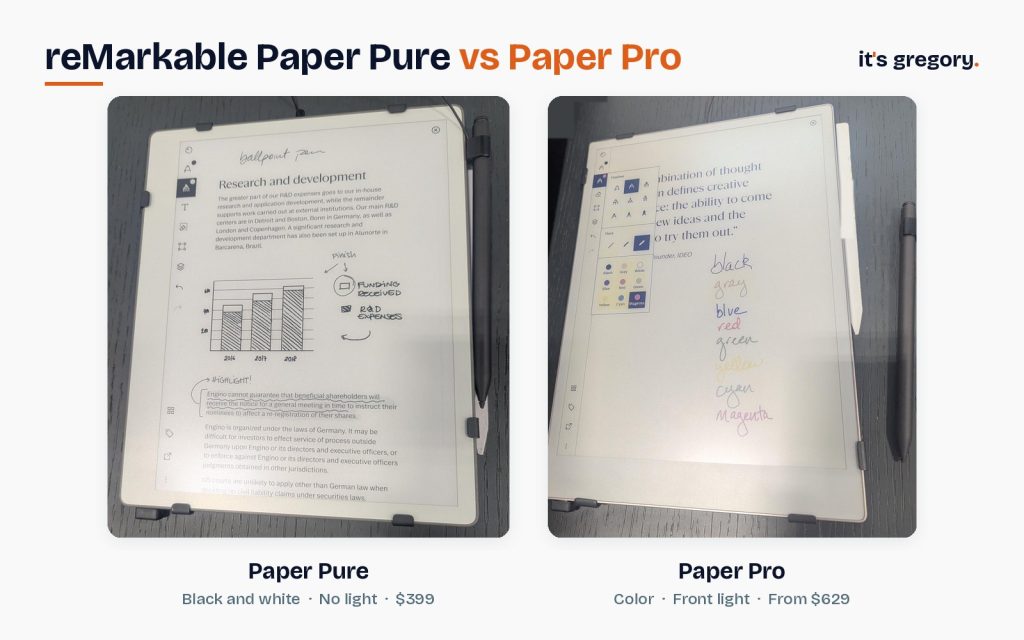
Two of them do. The Paper Pro and the Paper Pro Move both use reMarkable’s Canvas Color display, which reMarkable says can render 20,000 colors, so your blue ink, yellow highlights and red corrections show up in color on the page. The Paper Pure is black and white only, and so are the older reMarkable 2 and reMarkable 1.
Don’t expect the color you’d see on a phone or an iPad, though. Color e-ink is softer and more muted, closer to colored pencil on paper than to a glowing screen. It works well for color-coding a weekly plan, marking up a PDF or making a chart readable, and it’s less impressive for photos or artwork.
Does the reMarkable 2 have color?
No. The reMarkable 2 has a black-and-white screen, and so does my reMarkable 1. You can still pick colored pens and highlighters in the menu, but on the tablet itself they show up as shades of gray. In six years of daily writing, the only time I’ve really missed color is when highlighting, because a gray highlight just doesn’t pop the way a yellow one does. Since I don’t highlight much, it’s never bothered me enough to upgrade for it.
Is the color worth paying extra for?
For most people, no. I tried writing in several colors on the Paper Pro to see for myself, and the first thing I noticed was that each stroke appeared in a different shade before it settled into the color I’d picked, and sometimes that first flash was close to the opposite color. It only lasts a moment, but it pulled my attention away from what I was writing, which is the one thing a paper tablet is supposed to protect. Once the ink settles, the colors look good, just not good enough on their own to justify the jump from $399 to $629.
But if color-coding is how you think (sorting tasks by project, marking up contracts, studying with a color system), it’s a real upgrade, and the Paper Pro gives you a reading light along with it. That makes the Pro a much easier sell. So let’s look at each model on its own.
reMarkable Paper Pure: Best for Most People
The Paper Pure is the reMarkable I’d point most people to, because it does the one thing that matters most better than anything else in the lineup: it feels like writing on paper. When I wrote on the Paper Pure, the first thing I noticed was how familiar it felt. It wrote just like my reMarkable 1, with that same slightly rough, pencil-like drag that makes your handwriting look like your handwriting. reMarkable says its pen-to-ink distance is 0.84 mm, the closest of the three, which is why your lines seem to flow right out of the tip.
It’s also the easiest to live with. At 360 grams, it’s light enough to hold in one hand on the couch, the 10.3-inch screen is roomy enough for full-page notes and most PDFs, and reMarkable rates the battery at up to three weeks. It starts at $399 with the basic Marker, or $499 bundled with the Marker Plus and a Sleeve Folio. That’s $230 less than a Paper Pro before you add a single accessory.
So what’s the catch? There are two. The Pure has no reading light, so like a paper notebook, it needs a lamp or daylight. That’s the one thing I’d change about my own reMarkable 1, which has no light either, because I like to write and read at night. And the Pure has no keyboard option, so if you want to type, you’ll need a Paper Pro.
Buy it if you mostly write during the day, you want the best writing feel for the money, and black and white is all you need. Skip it if you write in bed, color-code everything or want a keyboard.
reMarkable Paper Pro: Best for Night Writing, Color and Typing
The Paper Pro is reMarkable’s flagship, and its best feature isn’t the color. It’s the light. The adjustable reading light means you can write in a dark room, read in bed or take notes in a dim meeting without hunting for a lamp, and after six years on a reMarkable 1 without one, it’s the feature I’d want most if I were buying today. If you’re the kind of person who journals at night, that alone may decide it.
It also has the biggest screen at 11.8 inches, which gives letter-size PDFs more breathing room, and it’s the only current reMarkable that works with the Type Folio, a keyboard cover that lets you type right alongside your handwriting. Add color on top of that and the Pro is the one model that can do everything the reMarkable software offers.
But all of that costs more. The Pro starts at $629 with the basic Marker, or $679 with the Marker Plus, and the Type Folio is extra. It’s also the heaviest at 525 grams, and then there’s the color flash I described above, which you’ll notice every time you write in color. Interestingly, the size difference felt smaller in my hands than it looks on the spec sheet. When I wrote on the Pro and the Pure side by side, they seemed about the same size to me, so don’t buy the Pro for the extra screen alone.
Buy it if you write at night, you want color or a keyboard, or you mark up a lot of large PDFs. Skip it if you mostly write in daylight in black ink, because the Pure gives you a better-feeling page for far less.
reMarkable Paper Pro Move: Best for Pocket Notes (If Small Really Works for You)
The Paper Pro Move is a Paper Pro shrunk to pocket size. It has the same color screen and adjustable reading light on a 7.3-inch display, and at 230 grams it’s the lightest reMarkable by far. It starts at $449 with the basic Marker, or $499 with the Marker Plus.
I wrote on the Paper Pro Move right alongside the Pure and the Pro, and I’ll be honest: it wasn’t for me. The page felt too small to be useful for the way I take notes. My weekly plans, meeting notes and study notes all want room to spread out, and on a 7.3-inch screen I’d be scrolling and zooming far more than writing. For quick notes that small, I’d just reach for my phone, which is already in my pocket.
That doesn’t make it a bad tablet. If you want something you can actually carry everywhere, like a reporter’s notebook for quick ideas, to-do lists and notes between meetings, the Move fits where the others can’t, and it gives you color and a light in the bargain. It also makes sense as a second reMarkable alongside a bigger one, since your notebooks sync between them. Just be sure about the size before you buy, because the Move is only $50 more than the Pure but gives you less than half the writing space.
Buy it if portability matters more than page size and you write short notes on the go. Skip it if this will be your only tablet and you write full pages, mark up PDFs or plan your week on it.
What About the reMarkable 2?
reMarkable stopped making the reMarkable 2 in May 2026 when the Paper Pure launched, but you can still buy one refurbished from reMarkable or renewed on Amazon. When I last checked, reMarkable’s refurbished bundles started at $349 with a Book Folio and $449 with a Type Folio, and a renewed reMarkable 2 with the Marker Plus was selling on Amazon for about $399.
Is a discontinued tablet a risky buy? Not with reMarkable. My reMarkable 1 was discontinued years ago, and it still gets regular software updates that keep it current with every new release. Honestly, that surprised me. The reMarkable 2 makes the most sense for one buyer in particular: someone who wants a black-and-white reMarkable with a keyboard, since the Pure has no keyboard option and the Paper Pro costs $629 before you add one. For everyone else, the Pure gives you more speed, storage and battery for about the same money. I’ve laid out the full trade-off in my Paper Pure vs reMarkable 2 comparison.
reMarkable Size Comparison: How Big Is Each Model?
Size is the one thing that’s easy to underestimate online and hard to change after you buy, so it’s worth picturing each one in your hands.
- Paper Pro Move (7.3″, 230 g): about the size of a reporter’s notebook. It fits a jacket pocket or a small bag, and it’s best for lists and short notes.
- Paper Pure (10.3″, 360 g): close to a standard notebook page. It’s big enough for full-page notes and most PDFs, and light enough to hold for a long time.
- Paper Pro (11.8″, 525 g): the closest to a full letter-size page. It’s the most comfortable for big documents and side-by-side work, and the most likely to live on your desk.
If you’re torn, think about where the tablet will spend most of its time. A tablet that lives on your desk can be big, and a tablet that goes everywhere with you should be light. For most people, the Pure’s middle size is the sweet spot between the two.

What Every Current reMarkable Has in Common
Whichever model you pick, you’re getting the same core experience. All three run the same reMarkable software with no apps, no browser and no notifications. All three open PDFs and ePUBs, convert your handwriting to typed text, and sync with reMarkable’s phone and desktop apps. And all three work with reMarkable’s optional Connect plan, though none of them needs it to do its job.
They share the same pen, too. The Marker Plus works on the Paper Pure, Paper Pro and Paper Pro Move, so if you ever move between models, your pen can come with you. One heads-up for longtime owners, though: Markers made for the reMarkable 2 don’t work on any of the current models, so your old pen stays behind if you upgrade.
Or Should You Skip reMarkable Altogether?
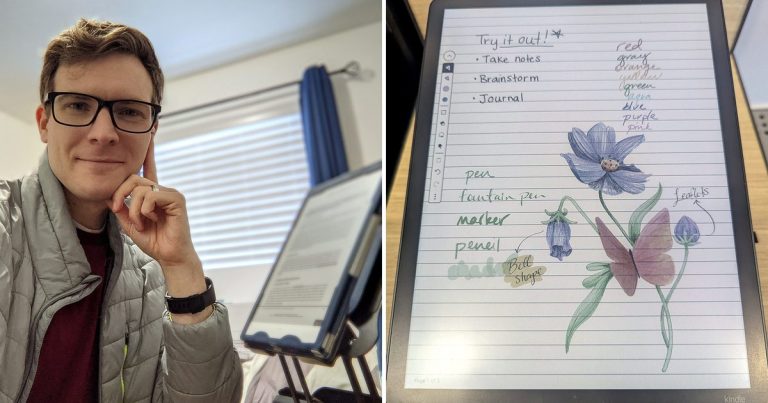
Here’s something you might not expect from a six-year reMarkable owner: if I were buying a new tablet today, I’d probably buy a Kindle Scribe Colorsoft. I read almost entirely on Kindle, and the one real downside of my reMarkable has always been that it can’t open Kindle books. The Scribe lets me read and write on the same device, it has a front light, and when I wrote on the Scribe Colorsoft right after the Paper Pro, its color showed up truer and without the lag. Its pen glides more like a marker than a pencil, which I liked more than I expected.
So if you read a lot of Kindle books, or a front light matters to you and the Paper Pro is over your budget, put the Scribe on your list. I compare them in detail in Kindle Scribe vs reMarkable. And if you’re still deciding whether you want a paper tablet at all, my reMarkable vs iPad comparison covers that question.
Frequently Asked Questions
Is the Paper Pure the reMarkable 3?
Not by name, but it’s the reMarkable 2’s successor in practice. reMarkable discontinued the reMarkable 2 when the Paper Pure launched in May 2026, and the Pure is now its 10.3-inch black-and-white model.
Which reMarkable is best for students?
For most students, the Paper Pure. It’s the most affordable, its 10.3-inch screen handles class notes and PDF readings well, and its three-week battery lasts through a busy semester stretch. Choose the Paper Pro if you study with a color system or do a lot of late-night reading.
Which reMarkable has a reading light?
The Paper Pro and Paper Pro Move both have adjustable reading lights. The Paper Pure, reMarkable 2 and reMarkable 1 don’t, so they need room light or daylight, just like a paper notebook.
Can I use a keyboard with a reMarkable?
Only with the Paper Pro in the current lineup, using reMarkable’s Type Folio. The Paper Pure and Paper Pro Move don’t support a keyboard. The discontinued reMarkable 2 also works with a Type Folio and is still sold refurbished.
Do you need a subscription for a reMarkable?
No. Every reMarkable works for writing, reading and converting handwriting to text without a subscription. reMarkable’s optional Connect plan ($3.99 a month) adds handwriting search, unlimited cloud storage and sync, and AI tools.
Is the reMarkable 2 still worth it in 2026?
Yes, if you want a black-and-white reMarkable with a keyboard or you find one at a good refurbished price. reMarkable says it will keep updating the reMarkable 2, and my discontinued reMarkable 1 still gets regular updates. Otherwise, the Paper Pure is the better buy for about the same money.
The Bottom Line
Three tablets, three sizes and two kinds of screen, but the answer is simpler than it looks. If you’re asking which reMarkable you should buy, start with the Paper Pure: it has the best writing feel, the friendliest price and the weight you’ll be happiest carrying every day. Move up to the Paper Pro if you write at night, think in color or want to type, and choose the Paper Pro Move only if a pocket-sized page truly fits how you work.
Whichever one you choose, you’re getting the same calm, distraction-free page that replaced a shelf of paper notebooks for me six years ago. So pick the one that fits your day. Then start writing! You just might find, like I did, that you don’t miss paper as much as you thought you would.
Sources
I checked specs and prices against reMarkable’s own pages in November 2026. Hands-on impressions come from six years with my reMarkable 1 and my own time writing on the Paper Pure, Paper Pro, Paper Pro Move and Kindle Scribe Colorsoft.