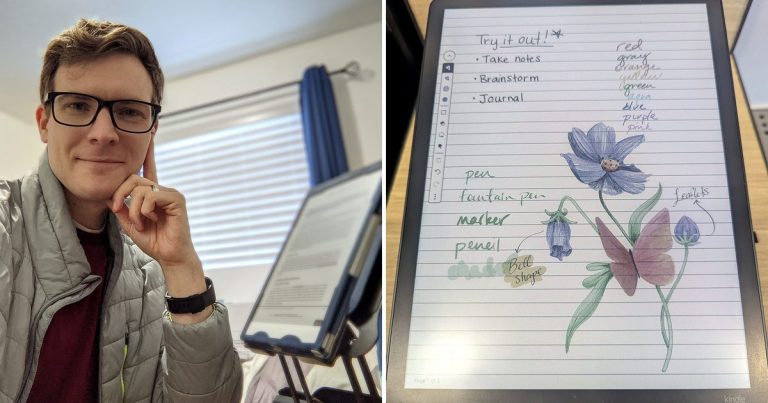
What Is a Paper Tablet? E-Ink Digital Notebooks Explained
“Which notebook does this go in?”
For most of my life, I asked myself that question every time I sat down to write. I’ve carried a notebook with me for as long as I can remember. In college I kept a separate one for every class, and outside of school I had a nicer notebook for my personal journal, another for keepsake memories, and yet another for daily study that never quite fit with the rest. Every time I needed an old note, I had to remember where I’d put it, and over the years the collection spilled across my bookshelves and into boxes in the attic.
So in 2020, I tried a reMarkable. The idea of one device that would end the daily question of where to write what, and keep every note I’d ever taken within reach no matter the subject, was hard to resist. It didn’t hurt that I’ve always been fascinated by e-ink, a technology that manages to feel both sophisticated and strangely calm. When my reMarkable arrived, I was like a kid on Christmas morning. Suddenly I had a never-ending sheet of paper that I could edit, copy, share, send, organize and reorganize, and all of my long reading and study materials, highlights included, fit into one elegant device. Six years later, I still reach for it nearly every day.

So what is a paper tablet? It’s a digital notebook with an e-ink screen that looks and feels remarkably close to paper, built for writing and reading rather than apps, email and video. You write with a pen, your pages are saved and filed into notebooks and folders, and nothing on the screen glows, pings or asks for your attention. Think of it as a paper notebook that never runs out of pages.
That’s worth understanding before you buy one. Paper tablets now come from five major brands, cost about $400 to $700, and are built for very different people. That’s a lot of money to spend on a device you don’t fully understand.
I’ve used my reMarkable 1 almost every day since 2020, and in September 2026 I tried the reMarkable Paper Pure, Paper Pro, Paper Pro Move and Kindle Scribe Colorsoft side by side at Best Buy. In this guide, I’ll explain what a paper tablet is, how e-ink actually works, what you can do with one, how it compares to an iPad, an e-reader and those inexpensive LCD writing boards, and how to choose your first one. I’ll also be honest about where they fall short, including the kinds of writing I’ve moved back to paper. If you already know you want one and just need a recommendation, my guide to the best e-ink tablets compares seven of them side by side.
What Is a Paper Tablet?
A paper tablet is a digital notebook built around an e-ink screen. You write on it with a pen the way you would on paper, and it saves your pages, sorts them into notebooks and lets you read and mark up PDFs and ebooks, usually without apps, email or notifications to pull you away.
Three things working together make a device a paper tablet rather than just a tablet with a stylus: an e-ink screen that reflects light the way a printed page does instead of shining it at you, a pen designed for that screen so your lines appear right under the tip instead of trailing behind it, and a matte, slightly textured surface that gives the pen a little drag. That friction is easy to overlook on a spec sheet. But it’s the reason writing on a paper tablet feels like writing, and writing on glass feels like sliding.
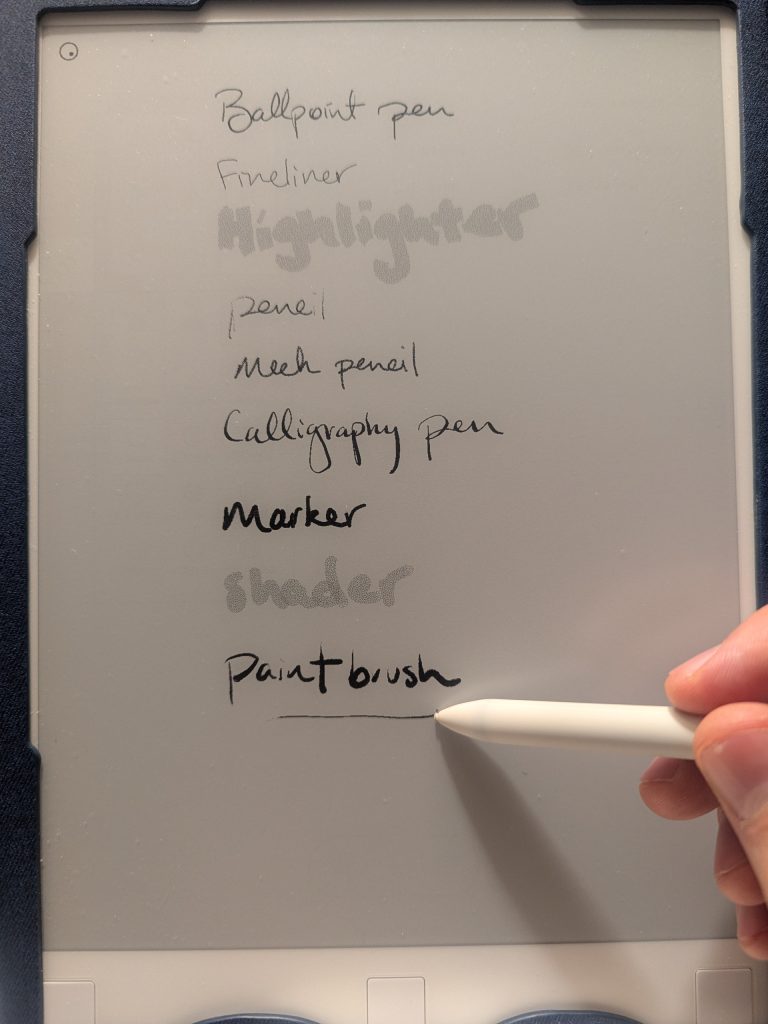
You’ll hear the same kind of device called a few different names. reMarkable, which calls its devices “paper tablets,” did more than anyone to popularize the term, but you’ll also see digital notebook, e-ink tablet, e-ink writing tablet, e-note and digital paper tablet. They all describe roughly the same thing. The one name that does not mean the same thing is “writing tablet,” which often refers to the cheap LCD boards I’ll get to below.
So how does a screen made of ink actually work?
How Does E-Ink Work?
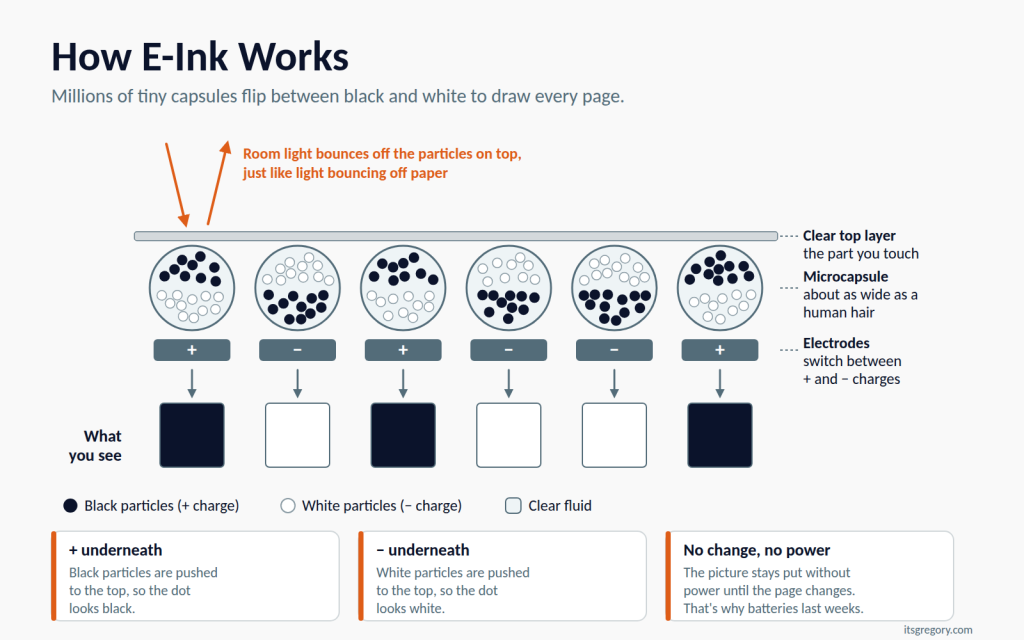
Believe it or not, an e-ink screen is closer to a chemistry experiment than a television. According to E Ink, the company that makes most of these displays, the screen is filled with millions of microcapsules about the width of a human hair, each holding negatively charged white particles and positively charged black particles suspended in clear fluid. When the tablet applies an electric charge to a spot on the screen, the black or white particles rise to the top of the capsule, and that spot turns dark or light. Put enough of those spots together and you get letters, lines and pictures.
Why does that matter? Because it explains almost everything people love (and sometimes hate) about paper tablets.
First, the screen is reflective. It doesn’t make its own light; it bounces back the light in the room, the way paper does. That’s why e-ink is easy to read in bright sunlight, where a phone or iPad washes out, and why it looks calm rather than bright.
Second, the screen is bistable, which means a picture stays put without any power. The tablet only uses energy when something on the screen changes, like turning a page or adding a pen stroke, so batteries last weeks instead of hours. reMarkable rates the Paper Pure at up to three weeks on a charge. That’s a lot of notes between charges!
Of course, there’s a catch: speed. Moving physical particles takes longer than switching pixels on an LCD, so e-ink refreshes more slowly, can leave faint “ghosts” of the previous page, and can’t play video in any useful way. Luckily, paper tablet makers have gotten very good at hiding this where it matters most, right under the pen tip, but you’ll still notice it when you scroll or zoom.
Black-and-White vs. Color E-Ink
Most paper tablets still use black-and-white screens, and they’re sharper and higher in contrast than the color versions. Color e-ink is newer and adds a filter layer over the screen, which makes colors look softer than on a phone and slightly mutes the black-and-white text underneath.
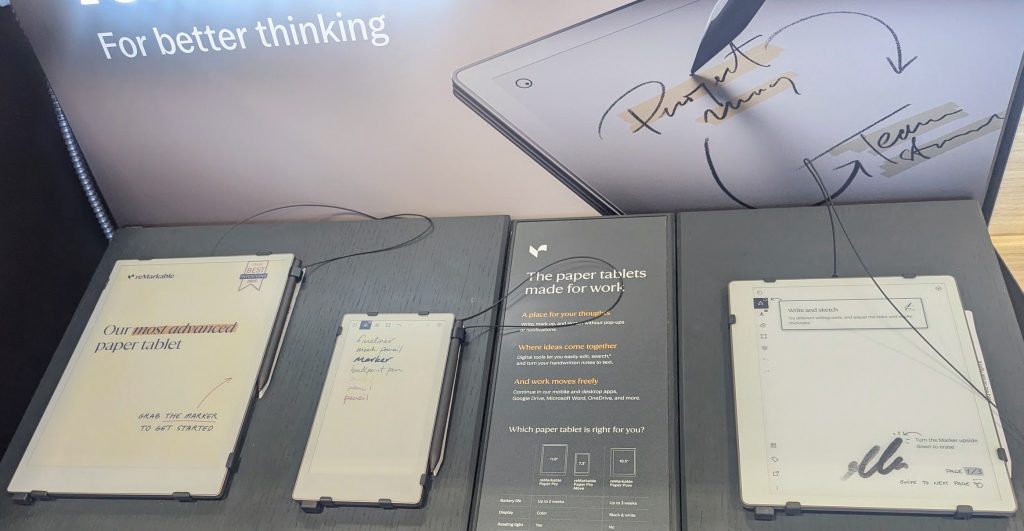
Unfortunately, not all color e-ink behaves the same. When I tried the reMarkable Paper Pro and the Kindle Scribe Colorsoft side by side at Best Buy, the Paper Pro’s colors looked muted, and each color stroke appeared in black first before changing a moment later. The Colorsoft’s colors were far truer and appeared instantly. Meanwhile, the black-and-white reMarkable Paper Pure had a crisper, more brilliant screen than any of the color models.
Front Lights
Because e-ink doesn’t make its own light, you need a light source in a dark room, just as you would with a book. Some paper tablets add a front light that shines across the surface of the screen, and some don’t. My reMarkable 1 doesn’t have one, and I hate needing a second lamp to see what I’m doing when I write or read at night. So if you do much of your reading or planning in the evening, get the front light. You’ll be glad you did.
What Can You Do With a Paper Tablet?
A paper tablet does a small number of things very well, and handwritten notes come first. Remember that never-ending sheet of paper? You can have as many notebooks as you want, file them into folders, move and resize what you wrote, and never run out of pages. On most models you can also turn your handwriting into typed text and send it to your computer.
The second big job is reading and marking up documents. You can load PDFs and ebooks, then write in the margins, underline and highlight. If you review contracts, read research papers or study from textbooks, this alone can justify the price, because you get the margins of a printout without the printing.
Beyond those two, paper tablets are good at the quieter kinds of thinking people used to do on paper:
- Planning: weekly plans, meal plans, calendars and to-do lists, often using templates or downloadable PDF planners
- Journaling: a private place to write that isn’t a phone
- Sketching and diagramming: rough drawings, mind maps and whiteboard-style thinking
- Meeting notes: handwritten notes you can search and share afterward (on some brands this requires a subscription; more on that below)
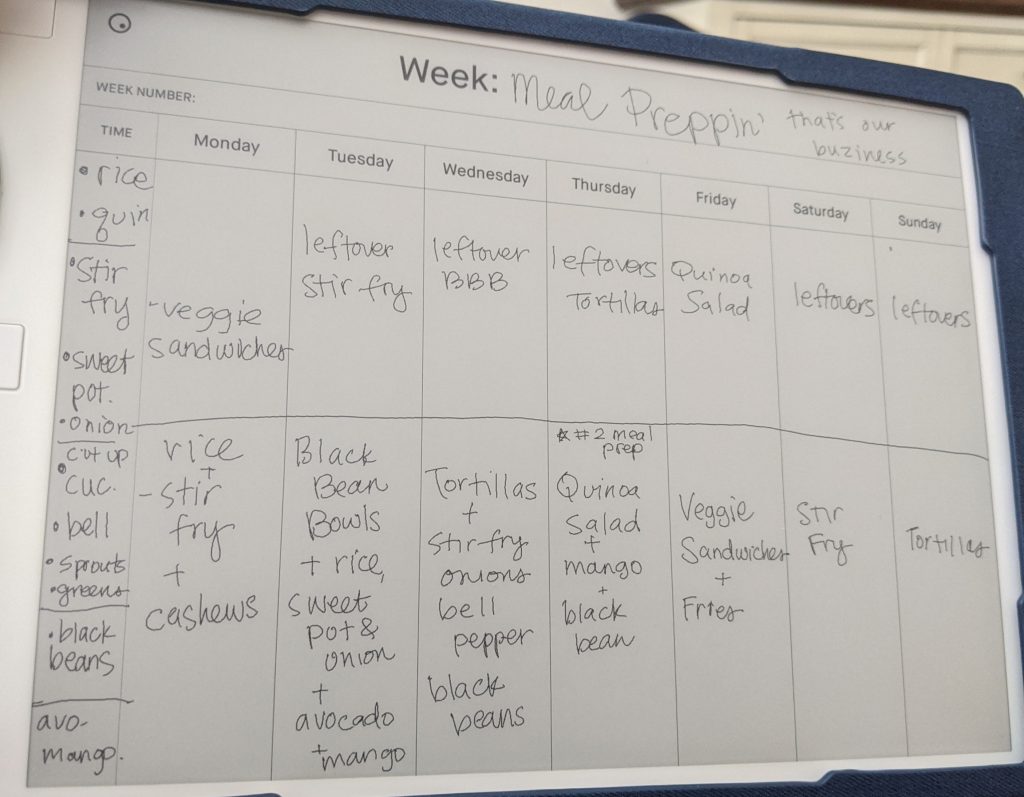
My own week on a reMarkable doesn’t follow a tidy schedule so much as it follows my thinking. I pick it up whenever I’m writing anything at all: morning thoughts, study notes, markups on documents, an evening journal entry, a brainstorming session or just a doodle while I work through an idea. Over the years it has quietly become whatever my brain needs in the moment, and it’s almost always within reach.
And that’s the real value. It isn’t any single feature; it’s that everything lives on one device. When I got my reMarkable, I stopped reaching for notebooks almost immediately, and it gave me a real sense of mental rest to know that whatever I needed to write or read, I could pick up the same thing. No more guessing which notebook to grab.
But if it’s a notebook with a screen, how is that different from an iPad?
Paper Tablet vs. iPad vs. E-Reader vs. LCD Writing Tablet
A paper tablet is easy to confuse with three devices you may already own. Here’s how they compare at a glance.
| Paper tablet | iPad | E-reader (Kindle Paperwhite, Kobo) | LCD writing tablet | |
|---|---|---|---|---|
| Screen | E-ink, reflective | LCD, backlit | E-ink, reflective | Pressure-sensitive LCD |
| Writing feel | Textured, close to paper | Smooth glass | Little or no writing | Stylus on plastic |
| Saves and organizes notes | Yes | Yes, with apps | Limited or no | Usually no |
| Apps, web, video | Few or none by design | Everything | Reading only | None |
| Battery life | Weeks | About a day | Weeks | Months to years |
| Typical price | About $400–$700 | About $500–$530 (base iPad + Apple Pencil) | About $150–$260 | About $10–$45 |
Paper tablet vs. iPad
So why not just use an iPad? An iPad can do nearly everything a paper tablet does and a great deal more. With an Apple Pencil and a note app, it’s a capable digital notebook, and it adds color, video, the web and every app you own. It doesn’t even save you much money: the entry-level iPad plus an Apple Pencil costs about $500, right in the middle of the paper tablet range. But you pay for all that with glossy glass that feels slick under a pen, a battery measured in hours, and every notification and app sitting one swipe away from the page you’re trying to think on. A paper tablet deliberately gives up everything else to do the writing part better.
Paper tablet vs. e-reader
Or what about a Kindle? An e-reader such as the Kindle Paperwhite uses the same kind of e-ink screen, but it’s built for reading books, not for writing. Most have small screens and no pen at all. The line blurs with devices like the Kindle Scribe, which is essentially a large Kindle with a pen, and Kobo’s Elipsa. Still, a regular e-reader is the wrong tool if handwriting is what you want.
Paper tablet vs. LCD writing tablet
If you search for a “writing tablet,” you’ll find a lot of thin, colorful boards that cost a small fraction of a paper tablet. These LCD writing tablets (Boogie Board is the best-known brand) show whatever you draw until you press a button to erase the whole screen. Basic models don’t save anything, can’t erase part of a page and can’t show a document. They’re wonderful for grocery lists, quick math and kids’ doodles. But they’re a digital chalkboard, not a digital notebook.
So if a paper tablet is what you’re after, which ones are worth a look?
The Main Paper Tablet Brands in 2026
Most people end up choosing among five brands, and each one leans in a different direction.
reMarkable is the brand most people picture, and it’s built around focused writing. Its tablets run no third-party apps, have no browser and send no notifications, and they have the most paper-like writing feel I’ve tried. To me it feels like writing with a pencil. The lineup is the black-and-white Paper Pure (about $400), which replaced the reMarkable 2 in May 2026, the color Paper Pro (about $680) and the pocket-size Paper Pro Move (about $500). Cloud sync and handwriting search require a Connect subscription ($39.90 a year).
Amazon’s Kindle Scribe is a large Kindle with a pen, which makes it the natural choice if you already buy books from Amazon. The standard Scribe and the color Kindle Scribe Colorsoft both include the pen and need no subscription. Writing on one feels more like using a marker than a pencil, and I found it very pleasant. In fact, the Colorsoft is the tablet I’d buy today.
Boox makes e-ink tablets that run Android, so you can install apps from Google Play, including Kindle, Kobo, Libby, OneNote and Notion. That flexibility is the whole appeal, and also the risk: a tablet that can run anything can also distract you with anything.
Supernote is for people who want a writing tablet with no strings attached. There’s no subscription for any feature, handwriting recognition works offline on the device, and its hardware is designed to be repaired.
Kobo, the other big e-reader brand, makes the Elipsa 2E (about $400), a 10.3-inch e-reader with a front light and the Kobo Stylus 2 included. It suits people who borrow library books or buy from Kobo’s store and want to take notes alongside their reading.
I tried the reMarkable Paper Pure, Paper Pro, Paper Pro Move and Kindle Scribe Colorsoft in person, and I compared the others using specs, the makers’ own pages and owner reviews. For specific picks, prices and trade-offs, see my full guide to the best e-ink tablets.
The Pros and Cons of Paper Tablets
After six years with one, here’s my honest ledger.
What paper tablets do well
- They feel like paper. The textured screen and low lag make handwriting feel natural in a way glass never quite does.
- They protect your attention. Most have no apps, notifications or browser, so a page stays a page.
- They’re easier on your eyes for long reading. In a small 2013 study in PLOS ONE, readers reported more eye fatigue on an LCD tablet than on an e-ink Kindle, while e-ink scored about the same as a printed book. Not every study agrees, so think of e-ink as gentler rather than a cure for eye strain.
- The battery lasts weeks, so you rarely think about charging.
- Everything is in one place, organized, searchable (on most brands) and backed up.
Where they fall short
- They’re expensive. Most cost $400 to $700 before you add a case, and a replacement pen can run $80 or more on some brands.
- Most are black and white, and color models cost more and can lag.
- Some have no front light, including my reMarkable 1 and the new Paper Pure.
- Some features need a subscription. reMarkable charges for cloud sync and handwriting search; Kindle, Boox and Supernote don’t.
- Pen tips wear down, though less often than you might expect. I replace the nib on my reMarkable every few months, and each one keeps working until it’s nearly worn away.
- They aren’t computers. You can’t comfortably browse the web, answer email or watch anything.
There’s one more limitation, and it has less to do with technology than with time. Some writing simply belongs on paper. There are things I want my kids, and someday my grandkids, to be able to hold and read, and I trust paper and ink to be there for them in a way I can’t quite trust a device or a cloud account. So my keepsake writing has gone back into real notebooks, along with quick throwaway notes. Maybe one day I’ll print everything I’ve written on my reMarkable so it’s preserved, too. Until then, I think paper and ink should be saved for the enduring things in life, and the tablet can handle everything else, which turns out to be most of what I write.
Who Should (and Shouldn’t) Get a Paper Tablet?
So should you get one? My short answer: if you write, yes. A paper tablet adds a level of convenience and accessibility to handwriting that paper simply can’t match, because every page you’ve written is organized, searchable and within reach wherever you are.
Ask yourself a few questions. Do you write by hand most days? Do your notes end up scattered across notebooks, sticky notes and loose pages? Do you read long PDFs and wish you could write in the margins? Do you want fewer screens competing for your attention? If you answered yes to any of those, a paper tablet will probably earn its place on your desk.
That makes it an especially good fit for people who sit in a lot of meetings, students who annotate readings and textbooks, and planners and journalers who love the ritual of writing but not the pile of notebooks it leaves behind.
On the other hand, it’s probably not for you if you rarely write by hand, if you want one device for email, web and video, or if you need vivid color for artwork or photos. In those cases, an iPad or a good laptop will serve you better.
How to Choose Your First Paper Tablet
So where do you start? These six questions will narrow the field quickly.
1. What’s its main job? If it’s mostly writing, look at reMarkable or Supernote. If it’s reading books with some notes on the side, look at the Kindle Scribe or Kobo. If you want your apps, look at Boox.
2. What size do you need? Screens between about 10 and 12 inches handle full pages and letter-size PDFs comfortably. Smaller tablets are easier to carry, but I found the 7.3-inch Paper Pro Move too small to be useful, with text on most documents too small to read clearly.
3. Do you need color? Color costs more and, on some models, lags behind the pen. In six years on a black-and-white screen, the only time I’ve missed color is when highlighting documents, where every highlight shows up as plain gray.
4. Do you read or write at night? If so, get a front light.
5. How do you feel about subscriptions? Check what’s included before you buy. reMarkable’s sync and search need Connect, while Amazon, Boox and Supernote include cloud sync for free.
6. What’s your total budget? Add the pen and case to the sticker price, since some brands sell the pen separately.
Answer those, and the right tablet usually picks itself. Then head to my guide to the best e-ink tablets for a specific model.
Conclusion
A paper tablet is a digital notebook that deliberately does less. It uses an e-ink screen and a pen to feel close to paper, keeps all your notes and documents in one place, and leaves out the apps and alerts that make other screens so noisy. It won’t replace your laptop, and it won’t replace every notebook, but for meeting notes, planning, studying and reading, it can quietly replace most of them.
After six years, I’d still recommend one to anyone who writes. Mine ended the constant question of which notebook to reach for, put every note I’ve taken at my fingertips, and left paper free for the things I want to last.
So pick one up, find your own never-ending sheet of paper, and start writing. You just might find that “Which notebook does this go in?” is a question you never ask again.
Ready to pick one? Start with my best e-ink tablets guide, where I compare seven paper tablets side by side.
FAQ
Is a paper tablet worth it?
It’s worth it if you write by hand often and want your notes organized, searchable and in one place. It’s not worth it if you need a general-purpose tablet for video, email or browsing, since an iPad does those far better for similar money.
Is e-ink better for your eyes than a regular tablet?
For long reading sessions, it appears to be gentler. Because e-ink reflects light instead of shining it at you, it behaves more like paper, and one small study found e-ink caused about the same eye fatigue as a printed book and less than an LCD tablet.
How much does a paper tablet cost?
Most well-known paper tablets cost between about $400 and $700. The reMarkable Paper Pure and Kobo Elipsa 2E sit at the low end at about $400, while color models such as the Kindle Scribe Colorsoft and reMarkable Paper Pro sit near the top. Budget for a case too, and for a pen on brands that sell it separately.
Can a paper tablet replace paper notebooks?
It can replace most of them. Mine replaced a separate notebook for every class, journal and study habit, though I still use paper for keepsake writing and quick throwaway notes.
Do paper tablets need Wi-Fi or a subscription?
No. You can write, read and organize notes offline on every major brand. Wi-Fi is only needed to sync, download books or update software, and only reMarkable charges a subscription for cloud sync and handwriting search.
Can you read Kindle books on a paper tablet?
Yes, on a Kindle Scribe, which is a full Kindle, and on Boox tablets, which can run the Kindle app from Google Play. reMarkable and Supernote don’t support Kindle books, though they read PDFs and DRM-free ebooks.
What are the downsides of digital note-taking?
Digital notes depend on a charged battery, a working device and, for syncing, a company’s cloud. Handwritten notes on a tablet can also be harder to skim than a paper notebook you can flip through. That’s why many people, me included, keep paper around for some things.
Sources
I checked how e-ink works and each device’s specs against the makers’ own pages, plus the research behind the eye-strain claims. Hands-on impressions come from my own reMarkable and my Best Buy visit.
- E Ink: How electronic ink works
- reMarkable Paper Pure features and specs
- reMarkable Paper Pro product page
- reMarkable Connect subscription pricing
- Amazon: Kindle Scribe lineup announcement
- Apple: iPad (A16)
- Apple: Apple Pencil compatibility
- BOOX Note Air6 C product page
- Supernote Manta product page
- Benedetto et al., “E-Readers and Visual Fatigue,” PLOS ONE (2013)